
Affiliate Disclosure
Some links on this page are affiliate links. As an Amazon Associate, we earn from qualifying purchases — at no extra cost to you. We do not buy, test, or physically handle the products we cover; our rankings come from aggregated owner reviews, ratings and expert consensus. Commissions never change our verdicts. How we rank & full disclosure.
The short version: a head-up display puts your speed — or your turn-by-turn directions — in your forward sightline so you glance down less. The two decisions that matter are the source (OBD2 for exact vehicle data, GPS for any car) and the display (a windshield reflection, which is cheap but glare-prone, or a dedicated screen). Ranked across thousands of owner reviews, our #1 pick is the ACECAR OBD2 + GPS HUD, because it does both sources and works in almost anything. Below is the full field and how to avoid the glare traps.
A HUD pairs naturally with the rest of a modern cockpit upgrade. See the full car audio hub, or if you want the whole screen experience, our double-DIN CarPlay stereo guide.
Top Picks at a Glance
Our #1 Pick: ACECAR OBD2 + GPS HUD
The ACECAR dual-mode unit is the HUD owners recommend first because it sidesteps the compatibility problem. Plugged into the OBD2 port, it shows accurate speed, RPM, coolant temperature and alerts on most 2008-or-newer cars; if your particular car will not broadcast the data it wants, it drops to built-in GPS so you still get a speed readout. Auto-brightness keeps it legible day and night. It is a windshield-reflection design, so bright sun can soften the image — using the included film helps — but for the money, the combination of accurate OBD data and a GPS safety net makes it the most broadly useful pick here.
Best Car Head-Up Displays 2026: The Ranked Field

Best for accurate data on most 2008+ cars
- Dual OBD2 + GPS modes
- Speed, RPM, water temp, alerts
- Auto-brightness for day/night
- Falls back to GPS if no OBD data
Why buy it: the HUD owners recommend first — it pulls real speed and RPM from your OBD2 port on most 2008-or-newer cars, and drops to built-in GPS if your car will not share data, so it works in almost anything.
Best for a cheap, accurate windshield speedo
- OBD2-fed speed and tach
- Overspeed and fatigue alarms
- Compass and altitude
- Reflects onto the windshield
Why buy it: the value pick owners buy to keep their eyes up — OBD2-accurate speed and RPM projected onto the glass for the price of a tank of gas, with useful overspeed and fatigue warnings.
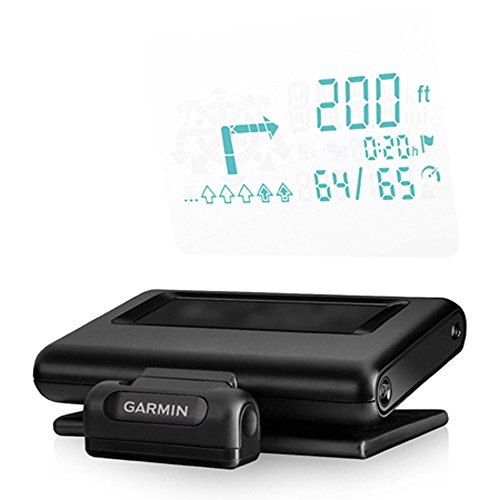
Best for turn-by-turn nav projected on the glass
- Projects turn-by-turn directions
- Pairs to a phone nav app
- Reflector film or lens included
- Adjusts to ambient light
Why buy it: the navigation-focused pick owners like for directions rather than gauges — it mirrors turn-by-turn guidance from a paired phone app onto a film or lens, keeping the map in your sightline.

Best for a cleaner mount that avoids glare
- Mounts on the A-pillar trim
- OBDII + GPS dual system
- Dedicated display, no reflection
- Works on most 2008+ cars
Why buy it: the pick for owners tired of windshield glare — it mounts on the A-pillar with its own screen instead of reflecting off the glass, so the readout stays crisp in bright sun.

Best for using your phone as the HUD source
- Reflective glass combiner
- Runs HUD phone apps
- Navigation and speed display
- No wiring, phone-powered
Why buy it: the no-wiring option owners choose to try HUD cheaply — a reflective glass combiner sits on the dash and mirrors a HUD app from your phone, so there is nothing to plug into the OBD port.
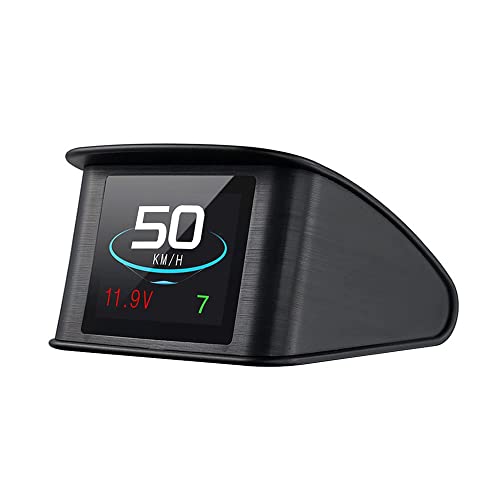
Best for a GPS-based projector for any vehicle
- GPS speed, works in any car
- TFT LCD projection
- Overspeed alarm
- Auto on/off with the engine
Why buy it: the universal GPS projector owners pick when their car has no usable OBD data — it reads speed from GPS so it works in older vehicles, projecting onto the windshield with an overspeed alarm.
Source: OBD2 vs GPS
Your first decision is where the HUD gets its numbers. An OBD2 HUD plugs into the diagnostic port and reads exact vehicle data — RPM, coolant temp, instantaneous speed — but needs a compatible port, generally 2008-and-newer cars, and a few models will not share the specific data. A GPS HUD reads speed from satellites, so it works in literally any vehicle including older ones, at the cost of engine data like RPM. The best all-rounders (our top pick) do both and fall back to GPS automatically. Match the source to your car: newer car and you want RPM, go OBD2; older car or you just want speed, GPS is foolproof.
Display: Reflection vs Dedicated Screen
Your second decision is how you see it. Most cheap HUDs reflect a bright number off the windshield — simple and inexpensive, but prone to glare in daylight and a faint double image on the glass unless you fit the reflective film. A few units use a dedicated screen on the A-pillar (the WiiYii P8) or dash, which avoids reflection entirely and stays crisp in bright sun. If daytime readability is your priority, lean toward a dedicated-screen unit; if you want the classic floating-number look for less, a reflection HUD with auto-brightness and the film applied does the job.
Navigation HUDs vs Speed HUDs
Decide what you actually want floating in your sightline. A speed HUD keeps your eyes up for the number that earns tickets — instant speed, RPM and the odd alert — and is what most owners drive with day to day. A navigation HUD, like the Garmin HUD+ or a phone-fed HUDWAY Glass, mirrors turn-by-turn directions instead, which owners find genuinely useful on unfamiliar routes but overkill for the daily commute. A few units try to do both, but the small combiner area clutters fast. Owners consistently report the cleanest experience comes from picking one job — speed for the commute, navigation for road trips — rather than cramming every readout onto the glass.
Wired OBD2 vs Wireless Phone HUDs
Most accurate HUDs are wired — a thin cable runs from the OBD2 port or a USB socket up to the unit, which owners tuck under the trim in about ten minutes. The trade-off is a cable to hide. Wireless phone-reflector HUDs skip the wiring entirely: a reflective combiner sits on the dash and mirrors a HUD app from your phone, which is the easiest and most affordable way to try the concept before committing. The catch is that the phone drains its battery and the app must stay open. For a buyer who wants set-and-forget accuracy, wired OBD2 wins; for the lowest-cost, no-install trial, a wireless phone reflector is the friendlier start.
Setup & Mounting: Windshield, Dash or A-Pillar
Where the display lives changes how well you can read it. A windshield reflection sits directly in your forward view and looks the most integrated, but it bounces light back off the glass and can ghost in daylight unless you apply the included film. A dash-mounted combiner or screen is easier to position and swap between cars, at the cost of dropping your eyes a fraction lower. An A-pillar screen, like the WiiYii P8, gives the crispest daytime image because nothing reflects — it just needs a tidy cable run. Whichever you choose, dry-fit it first: owners report that a few centimetres of placement makes the difference between a readable number and a distracting blur.
Cameras, Customization & Aftermarket Extras
Beyond speed and directions, some HUDs add features worth a second look. A handful bundle or pair with cameras — a front dashcam or a reversing feed — though owners note a dedicated dashcam usually outperforms a HUD's built-in one. More useful is a customizable display: units that let you choose which gauges show, reorder them, and set the colour and brightness earn the most repeat praise, because you can strip the readout back to just what you need. If your factory dash lacks a digital speedo or a tachometer, an aftermarket HUD is an affordable way to add one without touching the cluster. Skip the gimmicks; the extras owners actually keep using are custom layouts and honest auto-brightness.
Factory Heads-Up Displays vs Aftermarket HUDs
A growing number of new cars ship with a factory heads-up display built into the dash — premium trims and EVs like the Kia EV6 project speed and navigation onto the windshield straight from the factory. If your car already has one, an add-on unit is redundant. But most vehicles on the road still have no HUD at all, and that is where an aftermarket HUD earns its place: for a fraction of the cost of a factory option, a universal add-on brings the same eyes-up readout to an older or base-model car. Owners upgrading from no display consistently report the jump is bigger than any gap between the aftermarket units themselves — going from glancing down to glancing up is the real win.
A Quick Buyer's Guide by Priority
If the field feels crowded, a buyer can sort it by the one thing they care about most. Everyone weighs install effort, price and flexibility differently, so pick your priority and the shortlist narrows fast.
The Easiest HUD to Install
The easiest units skip wiring altogether — a phone-fed reflector like the HUDWAY Glass sits on the dash and mirrors an app, with no OBD port and no cable to hide. For a plug-and-play OBD2 unit, the ACECAR reads accurate speed the moment you seat it in the port.
The Most Affordable Entry Point
The most affordable way in is a GPS or OBD2 projector in the $30–$40 range — the ACECAR digital speedometer being the value pick owners point new buyers toward. It costs about a tank of gas and needs no subscription.
The Most Customizable Readout
If you want to choose exactly which gauges appear, look for a customizable OBD2 unit that lets you reorder readouts and set colour and brightness. Owners who like to tinker rate these highest because they can strip the display back to just speed, or load it up with RPM, temp and alerts.
Are Aftermarket HUDs Worth It in 2026?
The honest answer for most buyers is yes, with a caveat. HUD hardware has matured — auto-brightness, GPS fallback and cleaner projection are standard now, where a 2024 display might have ghosted badly — so a current unit does the core job well. The caveat is expectation: an aftermarket HUD is a speed-and-alert tool that anyone can fit in about ten minutes, not a factory-integrated nav system. If you drive an older car with no digital speedo, it is one of the highest-value upgrades on this hub; if your dash already shows everything you need, it is a nice-to-have rather than a must.
HUD Brands to Know: HUDWAY, LUFI, VGEBY and Budget Names
The HUD aisle is full of near-identical units sold under different names, so it helps to know the brands owners actually rate. HUDWAY is the best-known — beyond the phone-fed Glass combiner, it makes the dedicated HUDWAY Drive heads-up display and the Drive Pro, self-contained dash units that show a crisp, crystal-clear readout without reflecting off the glass. LUFI comes from the OBD gauge world and leans toward accurate engine data. Budget names like VGEBY and USUGER turn up constantly on sale and are fine as cheap GPS projectors, though owners warn their support and long-term reliability are hit-or-miss. Buy on the aggregated review score and warranty, not the brand logo — several of these units share the same internals.
How 2024 and 2025 HUDs Compare
HUD hardware moves fast, so the model year matters more than the marketing. A typical display from 2024 often relied on a single fixed brightness and could ghost badly in daylight, while 2025 units brought auto-dimming, sharper TFT panels and GPS fallback as standard rather than premium features. The over-the-top listing language — every unit is now "amazing" with an "amazing crystal clear" image — means little on its own; owners consistently report the real gains are in daytime legibility and how quickly the readout locks onto accurate speed. If you are comparing an older discounted unit against a current one, weigh the price cut against those readability improvements before you buy.
Quick Comparison
ACECAR OBD2 + GPS Head-Up Display
Best for accurate data on most 2008+ cars
Best Premium
Garmin HUD+ Navigation Head-Up Display
Check Price on Amazon
Best A-Pillar Install
WiiYii P8 OBDII + GPS Head-Up Display
Check Price on Amazon
Best Phone Reflector
HUDWAY Glass Universal Head-Up Display
Check Price on Amazon
Best Windshield Projector
TIMPROVE T600 Universal GPS HUD
Check Price on Amazon
How We Rank
A HUD is judged on accuracy, readability and compatibility, so we rank by aggregated owner ratings, review volume, and the themes owners repeat. We weigh four things. Data accuracy — whether the speed and gauges track reality, via OBD2 or GPS. Daytime readability — brightness, auto-dimming and freedom from ghosting. Compatibility — how many cars it actually works in, including a GPS fallback. And value — features for the price. Prices were current at the time of writing.
The Verdict
For accurate data that works in almost any car, the ACECAR OBD2 + GPS HUD is the one owners rate above the rest. Want it cheaper? The ACECAR digital speedometer is the value pick; want turn-by-turn navigation instead of gauges, and the Garmin HUD+ is the premium choice. If windshield glare bothers you, look at the A-pillar-mounted WiiYii P8. Check Price on Amazon →