
Affiliate Disclosure
Some links on this page are affiliate links. As an Amazon Associate, we earn from qualifying purchases — at no extra cost to you. We do not buy, test, or physically handle the products we cover; our rankings come from aggregated owner reviews, ratings and expert consensus. Commissions never change our verdicts. How we rank & full disclosure.
The short version: a dedicated car GPS earns its keep where your phone struggles — no cellular signal, dead battery, or a phone you would rather keep free for calls and music. Ranked across thousands of owner reviews, our #1 pick is the Garmin DriveSmart 66: a bright 6-inch screen, accurate routing, spoken driver alerts and free Wi-Fi map updates. Want reliable navigation for less? The Garmin Drive 52 is the value call. Below we cover why a standalone unit still makes sense and how to choose one.
A GPS lives on the same windshield real estate as your camera and screen. See the full dash cams hub or, for a windshield speed readout, our head-up display guide.
Top Picks at a Glance
Our #1 Pick: Garmin DriveSmart 66
The DriveSmart 66 is the standalone GPS owners recommend first because it does everything a navigator should, well. The 6-inch high-res screen is easy to read at a glance, the routing is accurate, and spoken driver alerts warn you about sharp curves, school zones and speed changes. Crucially, it gives free lifetime map updates over Wi-Fi, so it stays accurate for years, and it keeps working when your phone has no signal or has died on a long drive. Voice control and Bluetooth hands-free calling round it out. For a dependable, does-not-need-your-phone navigator, it is the pick owners trust.
Best Car GPS Navigators 2026: The Ranked Field

Best for the best all-round dedicated car GPS
- 6" high-res edge-to-edge screen
- Voice control + driver alerts
- Free lifetime map updates via Wi-Fi
- Bluetooth hands-free calling
Why buy it: the standalone GPS owners recommend first — a bright 6-inch screen, accurate routing, spoken driver alerts and free Wi-Fi map updates, so it keeps working when your phone has no signal or dies.

Best for reliable navigation on a budget
- 5" easy-to-read display
- Preloaded US/Canada maps
- Driver alerts for curves, cameras
- Simple on-screen menus
Why buy it: the value pick owners buy for straightforward, dependable turn-by-turn — a clear 5-inch screen with preloaded maps and safety alerts, without the extras you may not need.

Best for the top DriveSmart with lifetime updates
- 6" high-res display
- Advanced lane guidance
- Real-time traffic + lifetime maps
- Voice-activated navigation
Why buy it: the premium DriveSmart owners choose for the fullest feature set — advanced lane guidance, real-time traffic and lifetime map updates, the pick for frequent drivers who want the smartest routing.

Best for a compact high-res screen with smart features
- 5.5" edge-to-edge display
- Voice assist + hands-free calling
- Traffic and driver alerts
- Bluetooth smartphone link
Why buy it: the mid-size pick owners like for a crisp 5.5-inch screen in a compact body — the DriveSmart smarts of voice control and alerts without the larger unit’s footprint on the windshield.
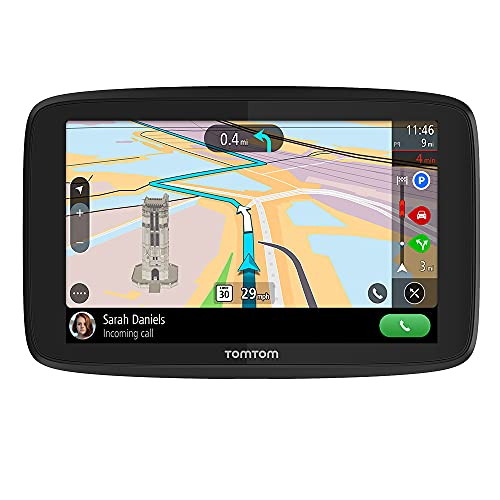
Best for world maps and TomTom traffic
- 6" screen, world maps
- TomTom Traffic + speed cameras
- Wi-Fi updates, hands-free calling
- Click-and-drive mount
Why buy it: the pick for owners who want an alternative to Garmin with worldwide maps — TomTom’s live traffic and speed-camera alerts with Wi-Fi updates and an easy click-and-drive mount.

Best for the 5.5" DriveSmart with lifetime updates
- 5.5" high-res display
- Voice assist, smart notifications
- Lifetime map updates
- Hands-free calling
Why buy it: the compact DriveSmart upgraded with lifetime maps and smart notifications — for owners who want the smaller screen but the full software feature set and never-expiring maps.
Why a Standalone GPS Still Makes Sense
Phones handle daily commutes fine, so be honest about when a dedicated unit is worth it — and it genuinely is in several cases. It works with no cellular signal, which matters on rural roads, in mountains and on long trips where your phone drops data mid-route. It does not drain your phone battery, tie up your phone, or overheat on a hot dash. And it gives a bigger, brighter screen with spoken lane guidance without touching your data plan. If you road-trip, drive for work, or just want your phone free, a standalone GPS is the right tool; if you only ever drive familiar city routes with strong signal, your phone may be enough.
How to Choose a Car GPS
Start with screen size — 5 inches is compact and blocks less view, 6 inches is easiest to read at highway speed. Insist on free lifetime map updates so it stays accurate for years without paying for map packs. Value live traffic and driver alerts (curves, speed cameras, school zones) for safer, smarter routing. Consider voice control and hands-free calling if you want to keep hands on the wheel. And mount it low and to the side so it never blocks your forward view. Garmin is the US default with the broadest support; TomTom is the alternative for worldwide maps.
Dedicated Units vs a Phone Navigation App
Your phone already runs a capable navigation app, so the honest question is whether a dedicated unit adds enough. Standalone units win when the internet does not cooperate — their maps live on the device, not in the cloud, so a canyon or a dead data zone does not strip your route. They also spare an Android or iPhone from cooking on the dash and draining mid-drive. If your phone handles every trip on strong signal, you may not need one; but if you don't want to lean on cellular for directions, a dedicated device is the safer tool.
Offline Maps, Live Traffic and Turn-by-Turn Guidance
The features that separate good navigators are the ones you notice mid-drive. Offline maps stored on the unit keep working with no signal; live traffic reroutes you around jams; and clear turn-by-turn voice guidance with lane arrows keeps you in the right lane at a complex interchange. Portable units add the bonus that you can move one between vehicles. Insist on free lifetime map updates so the maps stay current — an out-of-date map is worse than none, routing you onto a ramp that closed a year ago.
Dash Mounting, Inch Sizes and Dash Cam Space
Where the unit sits matters as much as which one you buy. Mount it low and to the side of the dash so it never blocks your forward view, and share the windshield sensibly if you also run a dash cam — the two devices fight for prime real estate. Screen inch size is a readability trade-off: a 5-inch unit is compact, a 6- or 7-inch is far easier to read at a glance, which is why it is often the pick for seniors or anyone who wants big, plain guidance. Drivers who venture off-grid — overlanding, marine or remote work — value a rugged unit with a backup track log, and some pair a GPS tracker for theft recovery.
Beyond the Car: Zumo, Marine and Portable Devices
A dedicated car unit is one of a wider family of Garmin GPS devices. The Zumo line is built for motorcycles, with a glove-friendly touchscreen and a rugged, weather-sealed body; Garmin's marine chartplotters do the same job on the water. What they share with a car navigator is the core appeal — a portable, self-contained map that does not lean on a phone or a data plan. If you split time between a car, a bike and a boat, know these are separate devices optimised for each, not one unit that does all three. For pure road use, the car-focused DriveSmart range is the right pick.
Keeping Your Garmin GPS Maps Up to Date
A navigator is only as good as its maps, so knowing how to update matters. On modern units the process is simple: connect the device to Wi-Fi and it downloads new maps and software on its own, no computer or cable needed. Owners who have tested older and newer models note the Wi-Fi units are far less fussy than the old plug-into-a-PC method. Run an update before any big road trip so a ramp that opened a year ago — or one that closed — is reflected in your route. If a unit's maps have gone stale and updates cost extra, that is a reason to prefer a lifetime-maps model next time.
GPS for Seniors and Phone-Free Driving
A big, plain dedicated unit is often the best pick for seniors or anyone who would rather not drive by phone. A 6- or 7-inch screen with spoken, large-text guidance is easier to follow than a small phone display, and because the maps live on the device it keeps routing without internet or a data plan. It also makes a reliable backup when an Android or iPhone dies or loses signal. For drivers who worry about theft on long trips, a separate GPS tracker is a different tool — it reports a vehicle's location rather than giving directions. Match the device to the need: a navigator for guidance, a tracker for recovery.
Quick Comparison
Garmin DriveSmart 66 6" GPS Navigator
Best for the best all-round dedicated car GPS
Best Value
Garmin Drive 52 5" GPS Navigator
Check Price on Amazon
Best Premium
Garmin DriveSmart 66 EX with Lifetime Maps
Check Price on Amazon
Best 5.5" Screen
Garmin DriveSmart 55 GPS Navigator
Check Price on Amazon
Best for Travel
TomTom GO Supreme 6" GPS Navigation
Check Price on Amazon
Best 5.5" Upgrade
Garmin DriveSmart 55 EX with Lifetime Maps
Check Price on Amazon
How We Rank
A car GPS is judged on routing accuracy, screen quality and how current its maps stay, so we rank by aggregated owner ratings, review volume, and the themes owners repeat. We weigh four things. Navigation accuracy — how reliably it routes and reroutes. Screen and readability — size, brightness and clarity at a glance. Map updates and traffic — lifetime maps and live traffic that keep it useful. And value and features — voice control, alerts and price. Prices were current at the time of writing.
The Verdict
For the best all-round dedicated car GPS, the Garmin DriveSmart 66 is the one owners rate above the rest. Want reliable navigation for less? The Garmin Drive 52 is the value pick, and the DriveSmart 66 EX adds lifetime maps and lane guidance for frequent travelers. Prefer worldwide maps, and the TomTom GO Supreme is the alternative. Check Price on Amazon →